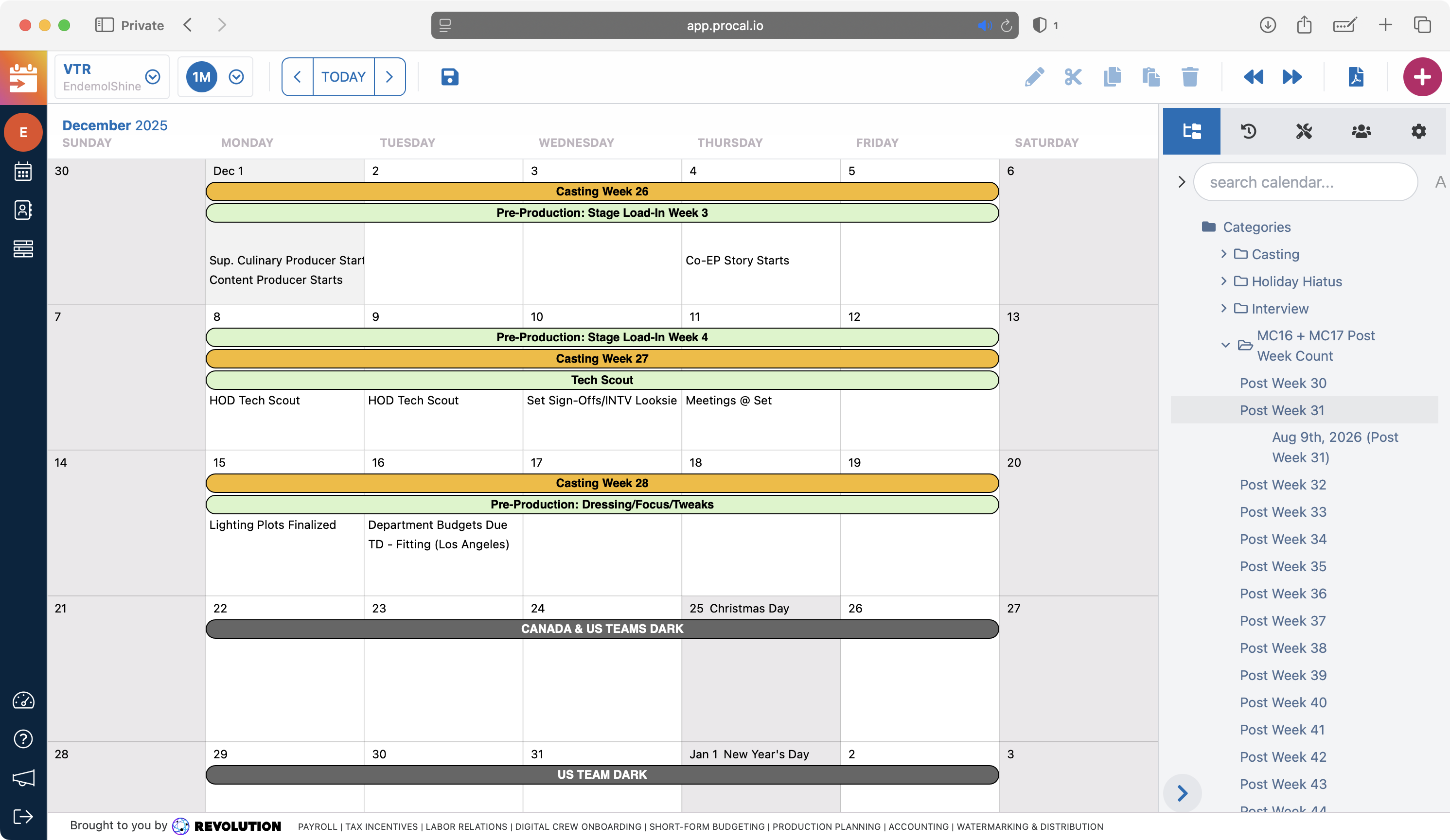
Entertainment production companies run on schedules — shoot days, crew calls, location bookings, talent windows, post-production timelines. Managing these across a slate of shows, with constantly shifting availability and overlapping constraints, is genuinely complex operational work.
ProCal was built to replace the industry’s reliance on large Excel grids and manual calendar logic with a purpose-built scheduling tool that understood the vocabulary of production.
The Scale
Over 7 years as sole developer, I made 97% of 6,000+ commits to the codebase. The platform scaled to:
- 3,000+ active users
- 400,000+ scheduled events
- Clients including Netflix, BBC Studios, Blumhouse Productions, and Sony Television
What I Built
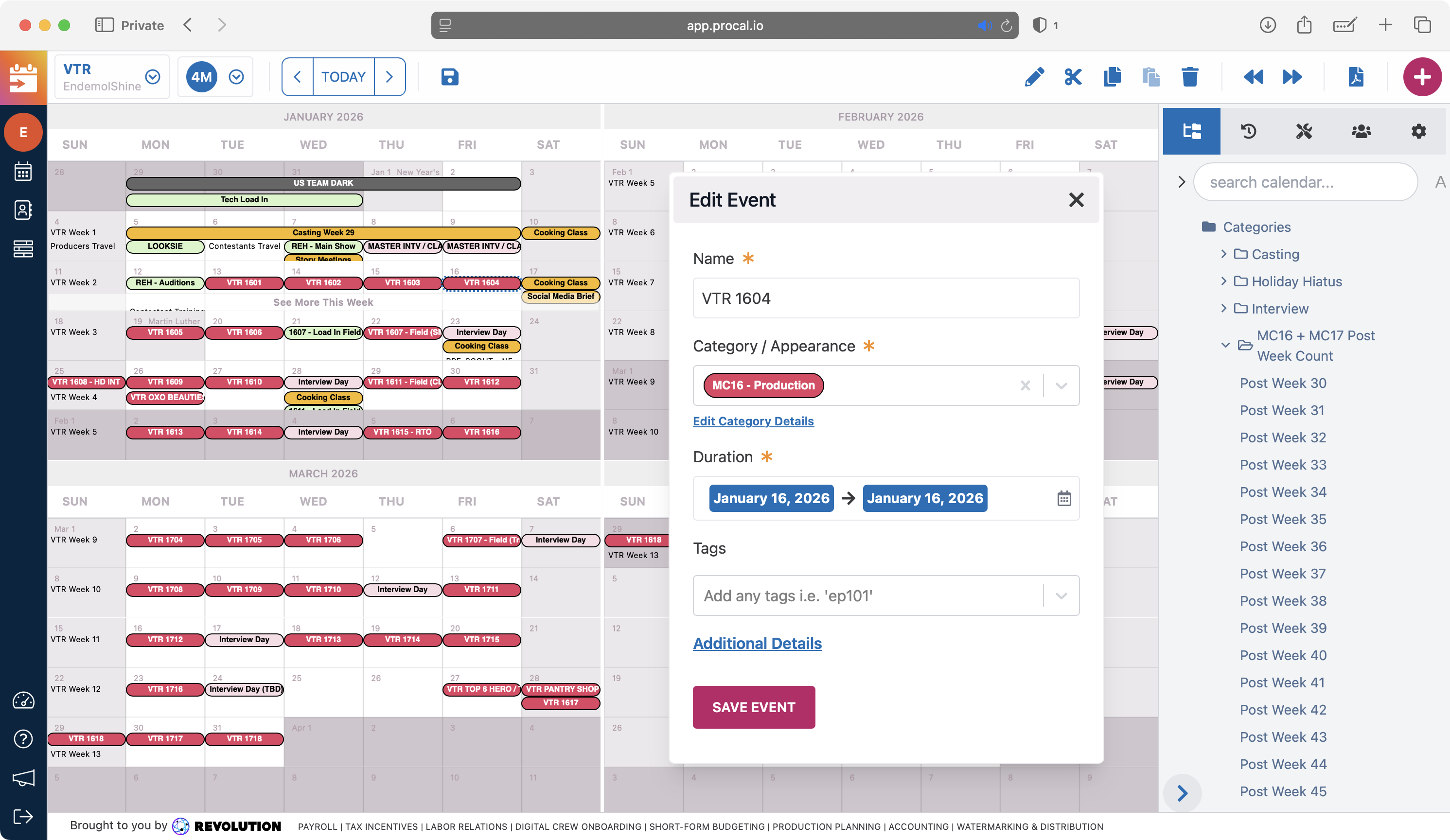
The heart of ProCal is a canvas-based calendar engine built on Konva and react-konva. Production schedules don’t map cleanly to standard calendar UI paradigms — they involve overlapping events, multi-day blocks, crew and resource conflicts, and the need to visualize months of production at a glance. A canvas renderer gives the flexibility to handle these constraints without fighting the DOM.
Six calendar view modes — from a day-level call sheet view to a multi-month production arc view — each with their own render logic but sharing a common event data model.
Drag-and-drop scheduling with conflict detection: moving a shoot day automatically flags crew availability conflicts, location double-bookings, and talent holds in adjacent productions.
Snapshot versioning lets production coordinators save named versions of a schedule — a feature that proved essential when studios needed to model “what if” scenarios before locking a production calendar.
PDF generation via AWS Lambda produces call sheets and production reports formatted to industry standard, generated server-side to keep output consistent regardless of browser or OS.
UX Wins — Working with Customers
ProCal’s UI vocabulary came directly from the people using it. Production coordinators, line producers, and unit managers sat with me through iterative reviews where I sketched layouts on the canvas, walked through scheduling scenarios, and watched where they hesitated. The interaction language — the way events stack, the affordances around drag handles, the visual hierarchy of resources versus time — was tuned in those sessions, not designed in isolation.
The result: a style and interaction system that mirrors how production teams already think about a schedule, rather than forcing them to translate their work into a generic calendar metaphor.
Performance Win — Making the DOM Optional
The dense views — multi-month production arcs, full-slate resource grids — could push thousands of event nodes onto the screen at once. Rendering each event as DOM was viable for the day-level views, but tanked at the larger zoom levels: layout thrashing, scroll jank, and memory pressure that pushed Chrome into reflows on every drag.
The win was treating the DOM as optional. The canvas-based calendar engine renders events directly to a Konva stage for the dense views, while the day-level views still use DOM where the affordances (text selection, native focus management, accessibility tooling) matter more than raw render throughput. Events share a single data model, so switching between modes is a render-strategy swap rather than a parallel implementation.
Technical Highlights
- Custom canvas-based calendar engine (Konva/react-konva) with 6 view modes
- Drag-and-drop scheduling with multi-resource conflict detection
- Snapshot versioning for production calendar scenarios
- PDF generation via AWS Lambda for industry-standard call sheets
- Scaled to 3,000+ users and 400,000+ events over 7 years as sole developer